
A salary slip format in Excel is a ready-made spreadsheet that shows an employee’s pay for one month: what they earned, what was deducted, and what they actually take home. You fill in the numbers once, the formulas do the maths, and you get a clean slip you can print or email as a PDF.
If you run payroll for a small business, you probably don’t need payroll software yet. You need a slip that looks professional, adds up correctly, and takes five minutes to fill in. That’s what the templates on this page are for. They’re free, they work in Excel and Google Sheets, and you can change the company name, logo and currency to match your business.
Free Salary Slip Templates – Download
All files are free to download and edit. No sign-up, no watermark.
Salary Slip Template for Ireland

Salary Slip Calculator Excel

Payroll Register Template Excel

Monthly Salary Slip

Free Salary Slip Template Online

Employee Salary Slip Template

Company Salary Slip Template

Simple Salary Slip Format for a Small Organization

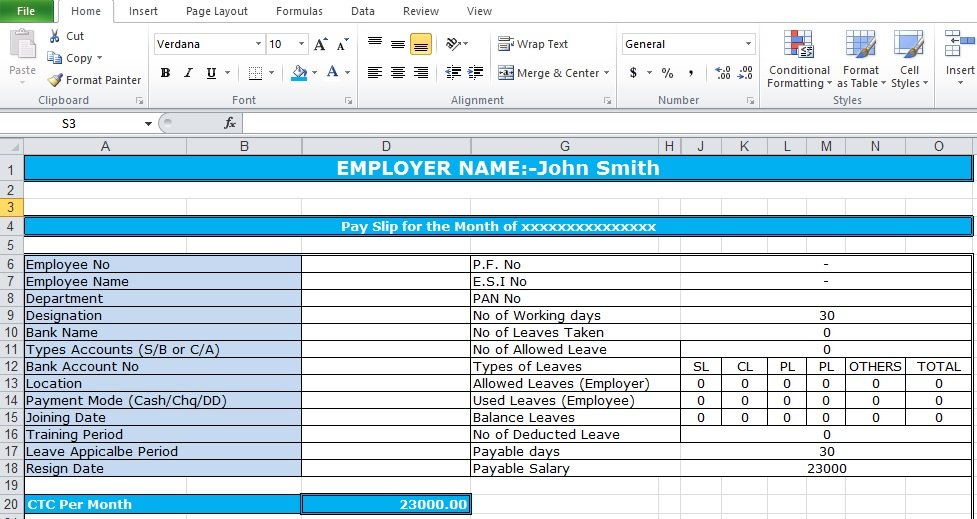
Salary Slip Format with Formula
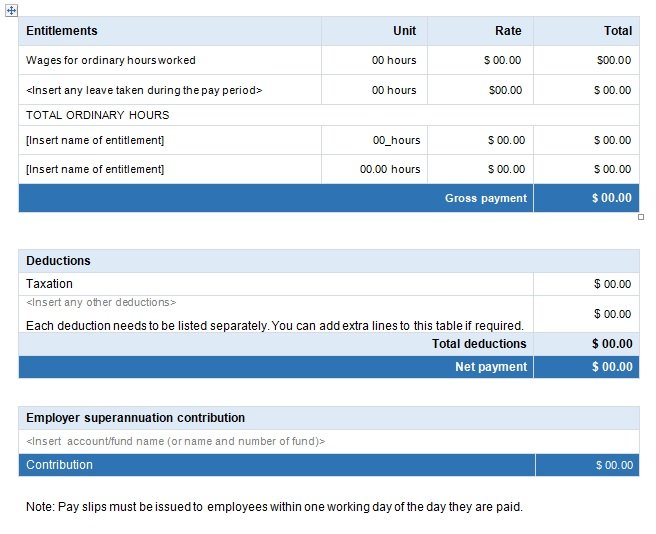
Salary Slip Excel Format
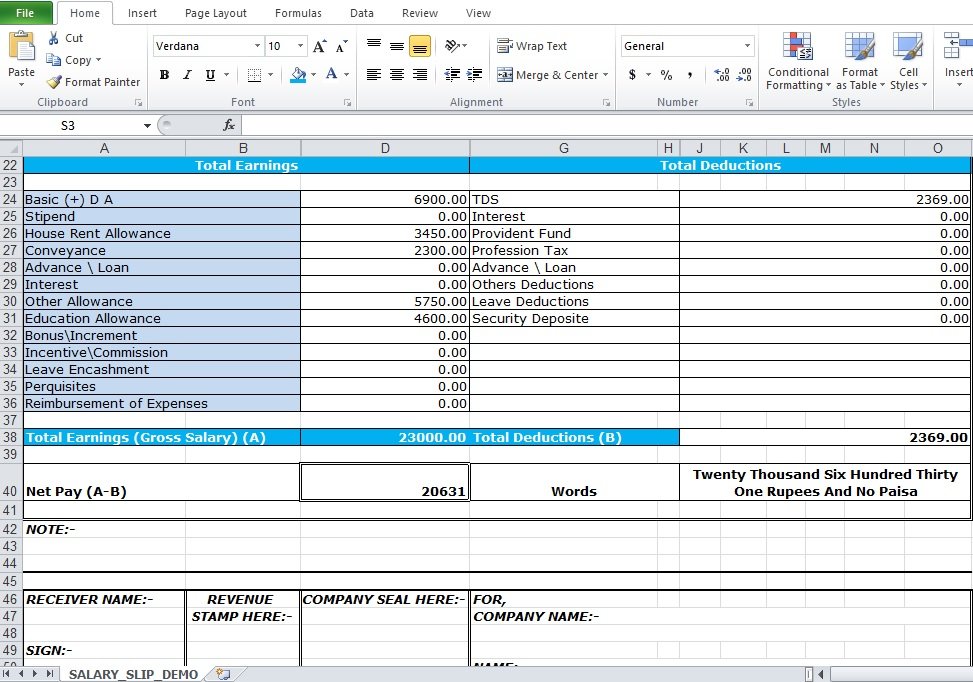
Salary Slip Template for PVT LTD Company

Monthly Salary Slip Template Free Download

Simple Salary Slip Format in Word Free Download

What a Salary Slip Should Include
A good salary slip answers three questions: who was paid, what they earned, and what was taken off. Here’s what goes on it. (It’s the same document many people call a pay stub — our employee pay stub template covers the same ground in a simpler layout.)
Company details — Business name, address and logo at the top. This is what makes the slip look official.
Employee details — Full name, employee ID, designation, department, date of joining and the pay period (month and year).
Earnings — Basic salary, house rent allowance (HRA), special allowance, overtime pay and any bonus. Each one on its own line, so the employee can see exactly where the money comes from.
Deductions — Provident fund (PF), professional tax, income tax (TDS), loan repayments or salary advances, and anything else the company deducts. Again, one line each.
Totals — Gross pay (all earnings added up), total deductions, and net pay — the amount the employee actually receives. Net pay = gross pay − total deductions.
Footer — Many slips also show the net pay in words (“Rupees forty-three thousand seven hundred only”), a line saying “This is a computer-generated slip”, and space for an authorized signature.
How to Make a Salary Slip Format in Excel
You can build one from scratch in about fifteen minutes. Here’s how:
- Set up the header. Merge the top cells and type your company name in bold, with the address underneath. On the next line, add “Salary Slip for [Month Year]”.
- Add the employee block. Two columns work well: labels on the left (Employee Name, Employee ID, Designation, Department, Pay Period), values on the right.
- Build the earnings table. List each earning on its own row — Basic Salary, HRA, Special Allowance, Overtime, Bonus — with the amount beside it. At the bottom, add the total with =SUM().
- Build the deductions table. Same idea on the other side: PF, Professional Tax, Income Tax (TDS), Other Deductions, with a =SUM() total at the bottom.
- Calculate the net pay. One formula: net pay = total earnings − total deductions. If gross pay is in B18 and total deductions in D18, the formula is =B18-D18.
- Add the finishing touches. Net pay in words, the “computer-generated” line, and a signature space for HR or the manager.
- Set the print area. Select the slip, go to Page Layout > Print Area > Set Print Area, and set the page to A4 portrait. Save a blank copy as your master template so you never have to rebuild it.
Making slips for the whole team
If you have more than a few employees, don’t make a separate file for each one. Keep one sheet as a register (one row per employee per month) and let the slip pull its numbers from it with a lookup. A SUMIFS formula does the job in any version of Excel:
=SUMIFS(Register!E:E, Register!A:A, $C$6, Register!B:B, $C$7)
That reads: add up the basic pay column where the month matches C6 and the employee ID matches C7. Change the first range for each field (allowances, deductions, days paid), and one slip template serves the whole company. Fix a mistake in the register and every slip updates. If your pay depends on hours worked, a time tracking spreadsheet keeps the hours in one place before they reach the register.
Salary Slip Example
Here’s what a finished slip looks like, with sample figures. If you want the pay split shown in more detail, the salary breakdown template lays out each component on its own line.
| Earnings | Amount (₹) | Deductions | Amount (₹) |
|---|---|---|---|
| Basic Salary | 30,000 | Provident Fund (12% of basic) | 3,600 |
| House Rent Allowance (HRA) | 12,000 | Professional Tax | 200 |
| Special Allowance | 5,000 | Income Tax (TDS) | 1,500 |
| Conveyance Allowance | 2,000 | — | — |
| Total Earnings (Gross Pay) | 49,000 | Total Deductions | 5,300 |
| Net Pay | ₹43,700 |
The figures are an example in rupees. The template works with any currency — just change the currency symbol in the cells. Deduction rates like PF and professional tax depend on your country and the current rules, so check them with your accountant before you run payroll.
How to Use the Downloaded Template
- Download the template that fits your business (the monthly slip suits most small companies).
- Replace the sample company name with your own, and add your logo if you have one.
- Fill in the employee details and the month’s figures. The formulas calculate gross pay, deductions and net pay for you.
- Check the numbers once, then print the slip or save it as a PDF and email it to the employee.
- If you pay drivers, the driver’s salary receipt template is built for that — it records trip-based pay and allowances in the same format.
- If you also handle small cash payments, the petty cash receipt template keeps those records in the same format.
Why a Salary Slip Matters
For employees, a salary slip is proof of income. Banks ask for it with loan and credit card applications, landlords ask for it with rental agreements, and visa applications often need it too. An employment verification letter covers the same proof of income in letter form, for employers who need to confirm a job in writing.
For employers, it’s a record. If there’s ever a question about what someone was paid — and there will be, eventually — the slip settles it in seconds. It also keeps your payroll consistent month to month, which matters at tax time.
Frequently Asked Questions
Is the salary slip format in Excel free to download?
Yes. Every template on this page is free, with no sign-up and no watermark. Download it, edit it, and use it as often as you like.
Will the template work in Google Sheets?
Yes. Upload the .xlsx file to Google Drive and open it with Sheets. The formulas carry over, and you can share the slip with your accountant straight from Drive.
How do I calculate net pay in Excel?
Add up all earnings with =SUM(), add up all deductions the same way, then subtract: =GrossPay-TotalDeductions. The templates on this page already have these formulas built in.
Can I make salary slips for more than one employee?
Yes. The simplest way is to copy the slip sheet once per employee. If you have a larger team, use the register-and-lookup method above so one slip fills itself from your employee list.
What should a salary slip include?
Company details, employee details, the pay period, a line-by-line list of earnings and deductions, and the net pay. The exact deductions depend on your country — PF and professional tax apply in India, for example, while other countries have their own payroll taxes.
Do I have to give employees a salary slip by law?
It depends on the country. In the UK and India, for example, employers must give workers a written pay statement each payday. Other countries have different rules, so check what applies where your business operates.
