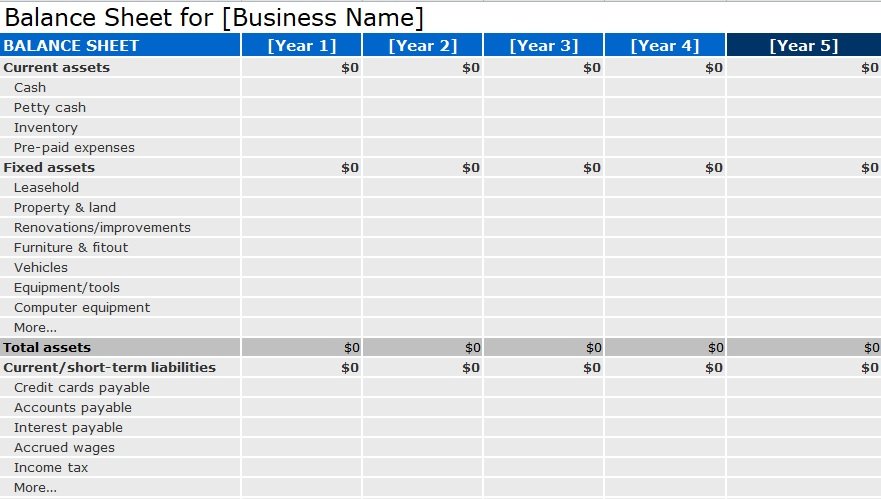
The balance sheet template (Word, Excel, PDF) is an important financial template that is used to record the data into balance sheet. The definition of the balance sheet is “It is a financial statement which is used to record data of assets (tangible or intangible) liabilities (both long term and short term) and capital use by the company also known as owners’ equity at specific time period” this particular statement is made by every business at any time like quarterly, semi-annually or annually.
This statement helps to tell the financial position of the business also known as the Snap-shot of company financial position. It is mandatory for every registered business to make a balance sheet and many other financial statements such as income statement; cash flow etc. in their prospectus so that every investor gets attracted to the company and it also attracts the investing companies. You may also like the Petty Cash Receipt Template.
According to companies ordinance 1984 “maintaining the financial record is mandatory for every business because many cooperate governance gurus say, if the company doesn’t make these statements it means they are tax thief.” So it is compliance.
Now in almost the digital firm management concept is applied, so companies use ERP enterprise resource planning system and many accounting and finance software such as SAAP, Oracle, and Quick Books, with the help of software the maintaining of record become easy and the manipulating of data is also a banned for all firms.
The digitally financial templates are varying from form to firm many firms use the American template and many use the British template. Below I’ll tell you the advantages and usage of these templates. You should also check the Expense Report Template.
Table of Contents
What is a Balance Sheet?
A balance sheet (also known as a statement of financial position) is a financial statement that captures a company’s assets, liabilities, and shareholders’ (or owners’) equity at a specific moment in time.
In short:
- Assets = what the company owns (cash, inventory, property, etc.)
- Liabilities = what the company owes (loans, payables, etc.)
- Equity = owner’s claim after liabilities are paid (share capital + retained earnings, etc.)And the key relationship:Assets = Liabilities + Equity.Corporate Finance InstituteBecause of that equation, the balance sheet is said to “balance”.
Why it matters
A balance sheet gives a snapshot of the financial health of your business at one point in time. It helps you assess:
- Liquidity (can the business meet short-term obligations?)
- Solvency (what’s the long-term financial risk?)
- Financial structure (how much debt vs equity?)
These insights help owners, lenders, investors, and managers make informed decisions.
Why Use a Template — Especially in Excel?
Templates save time, ensure consistency, reduce errors, and make it easier to update or compare periods. Using a spreadsheet tool like Microsoft Excel gives you the flexibility to format, automate calculations, and adapt the layout to your business needs.
Here are a few advantages:
- Pre-formatted headings, line items, calculations (e.g., totals)
- Ability to track multiple periods side-by-side
- Easily exportable/sharable format
- Ability to integrate with other spreadsheets (e.g., income statement, cash flow)
Key Components of the Balance Sheet
To build a proper “balance sheet format in Excel”, you must understand the key groups and line items that typically appear. Most balance sheets are divided into three main categories: Assets, Liabilities, Equity. Let’s break them down.
Assets
Assets are generally split into current assets and non-current (or long-term) assets.
- Current Assets: cash and other assets expected to be converted to cash or used up within one year (e.g., cash, marketable securities, accounts receivable, inventory).
- Non-Current Assets: assets that serve the business for more than one year (e.g., property, plant & equipment (PP&E), intangible assets).
- Typically in a balance sheet, assets are listed in order of liquidity (most liquid first) or grouped accordingly.
Liabilities
Liabilities are what the company owes and are also divided into current and non-current:
- Current Liabilities: obligations due within one year (e.g., accounts payable, short-term loans, current portion of long-term debt).
- Non-Current (Long-Term) Liabilities: obligations due beyond one year (e.g., long-term loans, bonds).
Equity
Equity (or shareholders’/owners’ equity) is essentially the residual interest in the assets of the business after deducting liabilities. It typically includes:
- Share capital or owner’s capital
- 0Retained earnings (accumulated profits not distributed)
- Other equity reserves
When You Might Need a Balance Sheet Format in Excel
Here are some common scenarios:
- Starting a new business and you want to set up your accounting system
- Year-end financial reporting and you need to prepare your statement of financial position
- Monthly/quarterly internal review
- Applying for a loan and the bank asks for a current balance sheet
- Investors or stakeholders request financial statements
- You want to compare year-on-year performance
- You plan to integrate with other financial statements (income, cash flow) and want consistency
Blank Balance Sheet Template
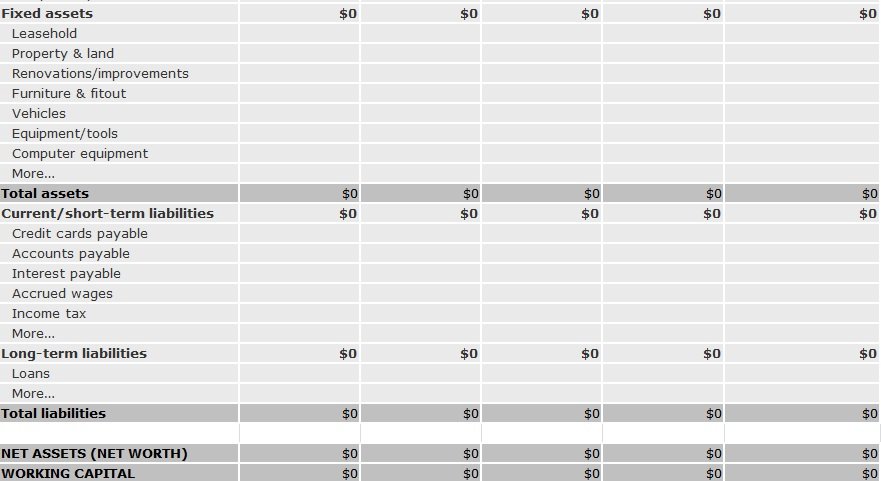
Monthly Balance Sheet Template Word
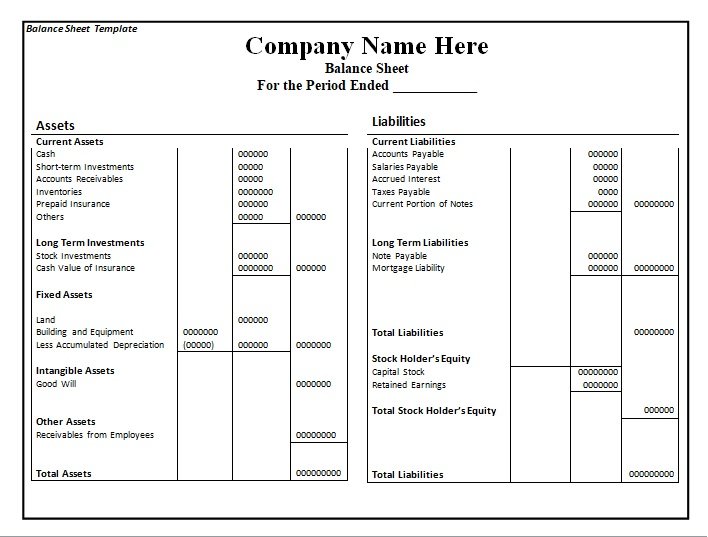
Balance Sheet for a Small Business
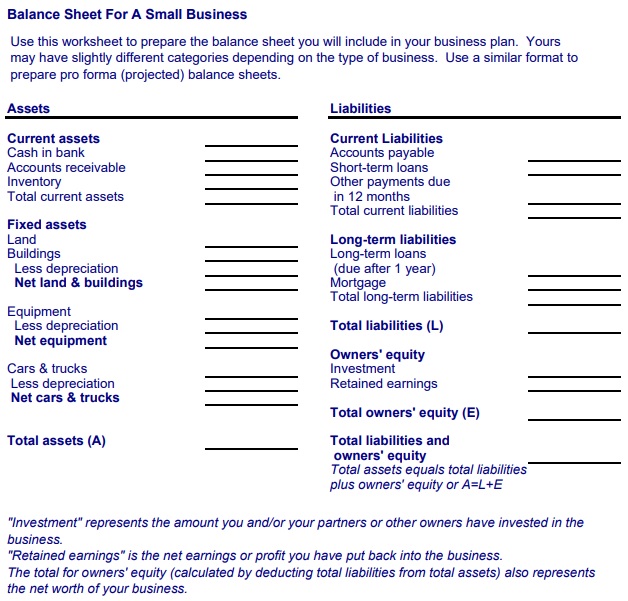
Balance Sheet Template Example
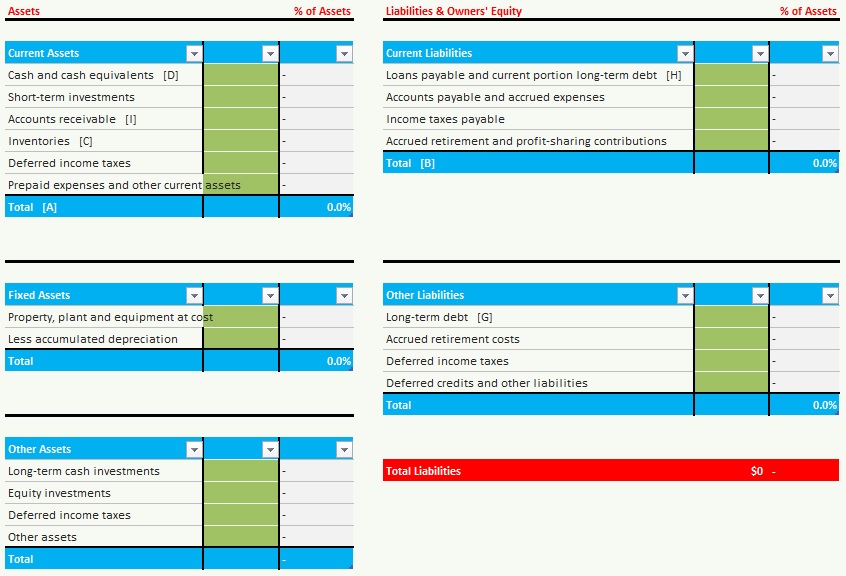
Balance Sheet Template Free Excel
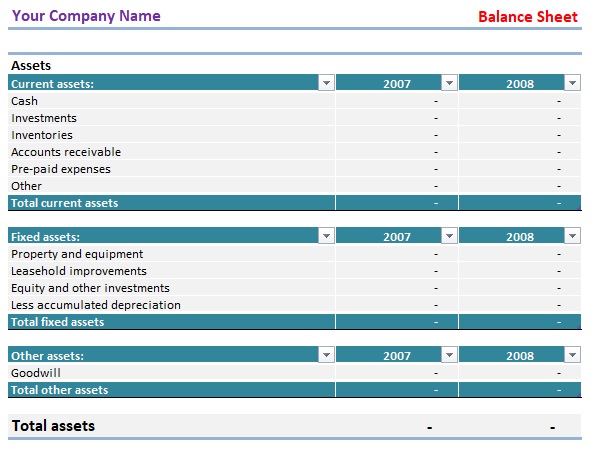
Balance Sheet Template Pdf
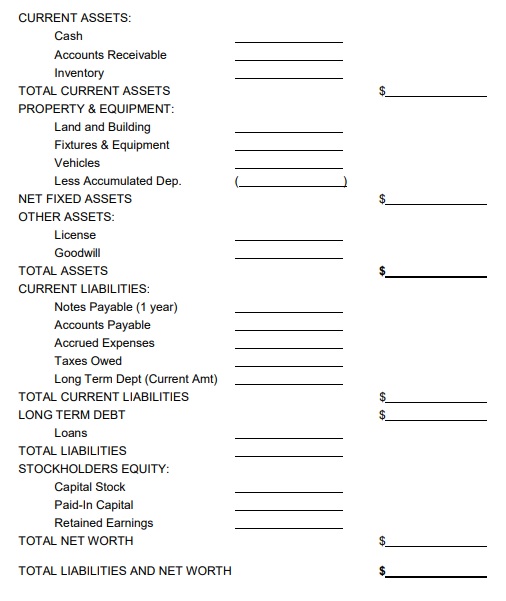
Advantages of Using Balance Sheet Template
The record-keeping is very important for every business and financial record is the backbone of every business so following are the benefits associated with using this balance sheet template format in excel and word:
- Business snap-shot.
- Investors and loans.
- Define priorities outline.
- Leverage the balance sheet.
- Cash transaction.
- Accretive to both GAAP and EPS.
- Manageable social issues.
- Clean the asset quality.
- Efficient operation.
- CFO is a capable manager for it.
- Facilitate re-entry.
- Easy to communicate with employees.
- Easy and concise.
- Assets = Liabilities + Shareholder’s Equity, way to learn balance sheet.
Family Balance Sheet
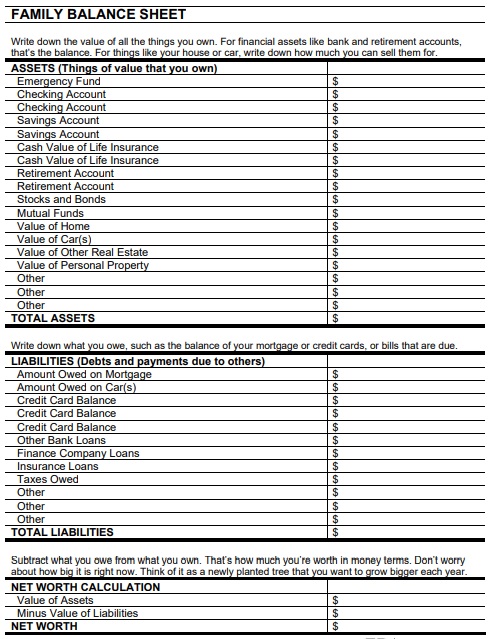
Free Downloadable Balance Sheet Template
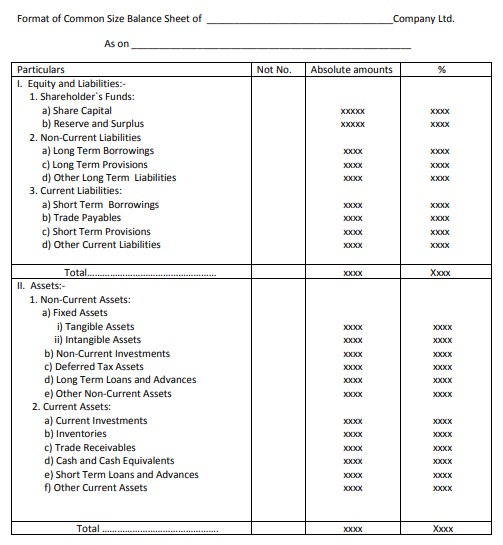
Free Fillable Balance Sheet
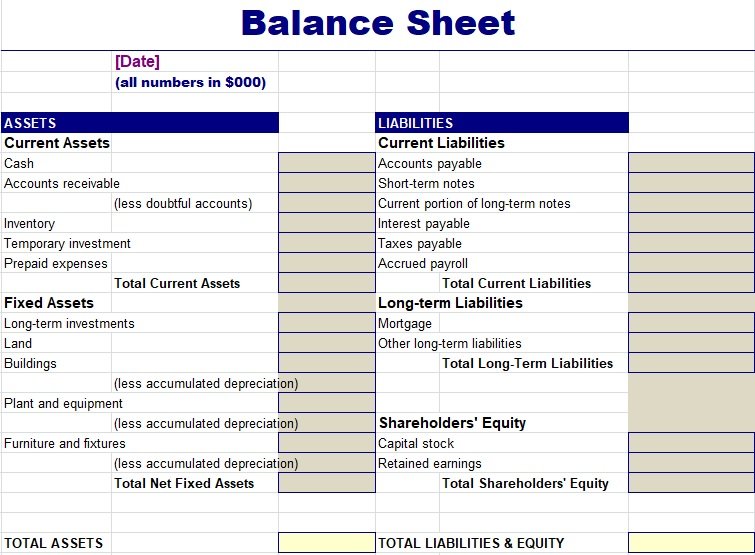
Personal Balance Sheet
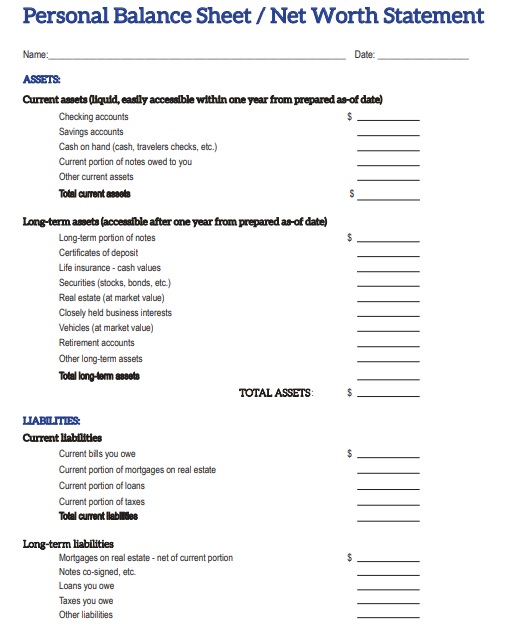
Ratio Balance Sheet Template
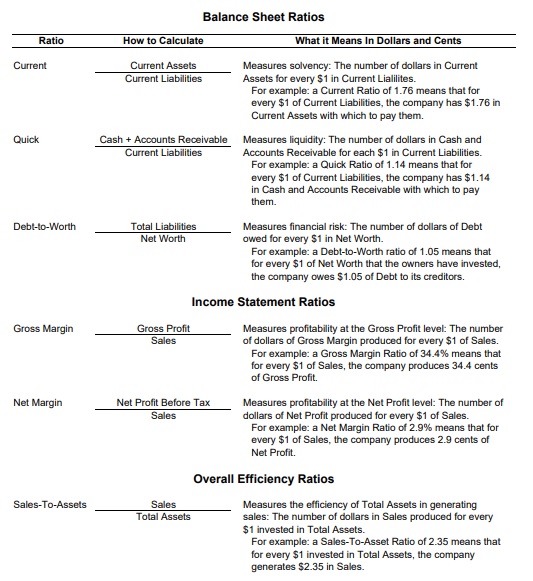
Simple Balance Sheet Template

Summarised Balance Sheet Template

How To Make The Balance Sheet Template?
Balance sheet template is made for your convenience so the following are the points that help to make it and adopt it: You may also see General Ledger Template.
- Date and time period of making a balance sheet.
- Amounts clarify in thousand and millions.
- Asset
- Current assets.
- Fixed asset.
Liabilities:
- Current / short term liability.
- Long term liability (more than 1 year).
- Shareholders’ equity/ owner equity.
- Total Assets.
- Total liability.
Date & time period:
As describe balance sheet is made on a specific date and specific time period.
Amounts:
To keep amounts noticeable and countable amounts are united represented by millions and thousands.
Assets:
On the left side asset column is made, in which assets are divided into short-term converted into cash in one year and long-term assets that are converted to cash by taking time more than a year.
Liability:
Long term and short term liability are written on the right side of the balance sheets. Liabilities are the obligation and debts of any company.
Total Assets and Liability:
At the end of the balance sheet total sum is calculated, and according to the rule of thumb total assets and total liabilities should be the same in amount.
In short Balance sheet template is very helpful for every business to record its financial record.
Final Thoughts
A good balance sheet template in Excel offers clarity, consistency, and reliability. When you build it with proper structure (Assets, Liabilities, Equity), strong Excel formatting and checks (the accounting equation), and proper review processes, you’ll have a tool that serves internal decision-making and external reporting. Whether you build it yourself or modify a ready-made template, the key is to ensure accuracy, clarity and usability.
FAQs:
What is the best “balance sheet format in Excel”?
There isn’t a one-size-fits-all. The best format is one that: you understand, reflects your business, allows comparisons over time, includes current & non-current assets/liabilities, and ensures the equation Assets = Liabilities + Equity holds.
Does a balance sheet need to have comparative periods?
While not always required, it’s highly recommended. Having side-by-side columns for previous periods allows you (or an external reader) to see trends and changes in your financial position. Comparison improves insight.
How often should I update the balance sheet?
At minimum, at year end. Many companies do it quarterly or monthly to monitor financial health. Using an Excel template makes frequent updates easier.
My balance sheet in Excel isn’t balancing (Assets ≠ Liabilities + Equity). What should I do?
Check for:
- Missing or misclassified line items
- Formulas referencing wrong cells
- Deprecation or adjustments omitted (e.g., accumulated depreciation not subtracted)
- Data entry errors (typos, omissions)
Add an error-check formula (as described above) so you quickly spot when the sheet doesn’t balance.
Can I use Excel templates for different types of businesses (small vs large)?
Yes. For smaller businesses you might use a simpler version (fewer line items). For larger businesses, you might need a more detailed template that aligns with external reporting standards (IFRS, GAAP), includes disclosures, and handles complex assets/liabilities. The core format remains the same.
What’s the difference between a “report form” and “account form” of a balance sheet?
- Account form: assets on the left, liabilities + equity on the right (mirroring T-account style).
- Report form: assets listed first (vertically), then liabilities, then equity beneath them.
In Excel you can choose either layout, but the report form tends to be more practical on a sheet.
You May also Like
 Raci Matrix Excel Template Free
 Free Printable Pre-Trip Inspection Sheet (Excel / Word / PDF)
- IT Manager Cover Letter (Samples & Examples)
- Printable One Sheet Templates for Business, Music & Event (Word / PDF)
- 11+ Free Leave of Absence Letter Templates (Word)
- Free Nebraska Car Bill of Sale Form (Word / PDF)