
Every taxi ride ends with a payment, and every payment deserves a clear record. A taxi invoice template gives drivers a ready made form for that record, with space for the trip details, the fare breakdown, and the payment method, so nothing has to be worked out from memory at the end of the day.
On this page you will find 7 free printable taxi invoice and cab receipt templates in Excel and Word. Below them is a sample invoice layout you can copy, the key elements every invoice needs, Excel formulas that calculate the fare, and a step by step guide to invoicing after each ride.
Sample Taxi Invoice Layout
Use this layout as a guide for any template on this page. The top section records who drove, who rode, and where the trip went, and the fare table shows how the total was reached.
| Field | Example |
|---|---|
| Invoice/Receipt No. | TX-2026-0842 |
| Date & Time of Ride | 26 November 2026, 09:40 AM |
| Driver/Cab Company | City Cabs, Driver A. Rahman (ID 4417) |
| Vehicle Plate/Cab # | Cab 214, Plate XYZ-4821 |
| Passenger Name | Daniel Lee |
| Pickup Location | Central Station, Main Entrance |
| Drop-Off Location | Airport Terminal 2, Departures |
| Distance & Duration | 14.2 miles / 28 mins |
Fare Breakdown
| Charge | Details | Amount |
|---|---|---|
| Base Flag-Fall Fare | Standard city meter start | $4.50 |
| Distance Charge | 14.2 miles @ $2.20/mile | $31.24 |
| Waiting Time Charge | 6 mins traffic delay @ $0.50/min | $3.00 |
| Airport/Toll Surcharge | Express Tunnel Toll | $5.50 |
| Subtotal | $44.24 | |
| Tax/VAT (5%) | 5% of $44.24 | $2.21 |
| Total Fare Paid (Card) | $46.45 |
Check the math first. The distance charge is 14.2 miles at $2.20 per mile, which comes to $31.24, and waiting is 6 minutes at $0.50 per minute, which comes to $3.00. Add the flag-fall fare of $4.50 and the toll of $5.50 for a subtotal of $44.24. Tax at 5 percent adds $2.21, so the passenger pays $46.45.
What Is a Taxi Invoice Template?
A taxi invoice template is a pre-formatted document that a taxi driver, cab company, or private hire operator uses to bill a passenger for a ride. It lists the date and time of the trip, the pickup and drop-off points, the distance traveled, and each part of the fare, then shows the total amount paid and how it was paid.
The template saves the driver from writing the same details out by hand. Word versions are easy to print and fill in by hand, while Excel versions add up the fare automatically. A meter receipt is only a short slip from the meter. An invoice is the fuller document a business traveller needs, with driver details, an invoice number, and an itemized fare breakdown.
Why Every Taxi Driver Should Use an Invoice Template
Many drivers still rely on memory, a notebook, or a scrap of paper to record fares. That works until a passenger questions a charge, a company asks for proof of a trip, or tax time arrives and the records are incomplete. An invoice template fixes that, because every ride leaves the same clear paper trail.
- Professional Image: a printed invoice with your company name, cab number, and an itemized fare looks far more professional than a handwritten note. Passengers trust a driver who gives a proper receipt, and corporate clients expect one.
- Easier Tax Filing: at the end of the tax year, your invoices are your income record. Each one shows the date, fare, and total, so adding up your earnings takes hours instead of days.
- Payment Transparency: when every charge is listed separately, base fare, distance, waiting time, tolls, and tax, the passenger can see exactly what they paid for. That stops arguments about the fare.
- Business Growth: invoices are also a record of your busiest routes, your best hours, and your regular customers. Over a few months, that record shows where the work is.
- Proof and protection: if a passenger claims they were overcharged, the invoice is your evidence. It records the route, the time, the distance, and the amount paid. Keep a copy of every invoice, even for cash rides.
Types of Taxi Invoice Templates
Templates come in a few common forms. Some drivers need a full invoice, while others only need a simple receipt.
- Taxi invoice template (Word or Excel): the full document, with driver and company details, an invoice number, trip details, and a fare breakdown. Word suits printing, while Excel calculates the fare.
- Blank taxi receipt template: a short receipt with blank fields for the date, fare, and driver signature. Best for drivers who want a quick receipt without the full invoice layout.
- Cab receipt template: a receipt made for cab companies, often with space for the cab number and company logo. Best for fleets where several drivers use the same form.
- Taxi fare receipt template: a receipt that focuses on the fare, with separate lines for the base fare, distance charge, waiting time, and tolls. Best when a passenger needs to see how the fare was worked out.
- Printable taxi receipt template: a simple receipt designed to print cleanly on one page, often several copies per sheet. Best for drivers who print a batch at the start of the week.
Key Elements of a Taxi Invoice
Every taxi invoice needs the same nine elements. Leave one out and the invoice may be rejected by an accounts department or fail as a tax record.
1. Driver or Company Details
The name of the driver or cab company, a phone number, and the cab or license number. This tells the passenger who provided the ride and who to contact.
2. Invoice Number
A unique number for each invoice, such as TX-2026-0842. Use numbers in order, without gaps.
3. Date of Service
The date and time of the ride. For airport runs and late night trips, include the time too, because the fare can depend on the hour.
4. Passenger Details
The name of the passenger, and a company name if the ride is for business. A company needs this to match the invoice to the right employee.
5. Trip Details
The pickup and drop-off locations, the distance traveled, and the trip duration. Write the full addresses, so the route can be checked later.
6. Fare Breakdown
Each charge on its own line: base fare, distance charge, waiting time, tolls, and tax. A single total with no breakdown is hard to verify and easy to reject.
7. Total Amount
The full amount the passenger paid, shown clearly at the bottom. If tax is included, show the subtotal and the tax separately, then the total.
8. Payment Method
Whether the passenger paid by cash, card, or app, and the last four digits of the card if they paid by card. This avoids disputes about whether a ride was paid.
9. Notes or Terms
Any extra notes, such as a toll receipt number or a booking reference. Keep it short and only add what is actually needed.
How to Create a Taxi Invoice (Step-by-Step)
Creating a taxi invoice takes about a minute once you have a template. Follow these steps after each ride.
Step 1: Download a Template
Pick one of the templates below. Choose Excel if you work from a computer or tablet, so the fare is calculated for you, or Word if you print receipts in advance.
Step 2: Add Your Driver and Company Details
Fill in your name or company name, phone number, cab number, and vehicle plate once, then save the file as your master copy.
Step 3: Enter the Trip Details
Write the invoice number, the date and time, the passenger name, and the pickup and drop-off locations. Add the distance from the meter and the trip duration.
Step 4: Calculate the Fare
List each charge separately: base fare, distance charge, waiting time, tolls, and tax. In Excel, use the formulas below so the total is worked out for you, then check it against the meter.
Step 5: Record the Payment Method
Note whether the passenger paid by cash, card, or app, and write the total amount paid. If they paid by card, ask if they want a copy by email as well as on paper.
Step 6: Give the Invoice to the Passenger and Keep a Copy
Hand the invoice to the passenger or send it by email, and keep a copy for yourself. File copies by invoice number and date, as your income record.
Excel Fare Calculation Formulas
If you use the Excel template, let the spreadsheet do the math. Enter each fare part in its own cell, then use formulas for the rest, so a typing error cannot silently change the total.
To work out the full fare, use =Base_Fare + (Miles*Rate) + Waiting_Fee + Tolls. In a real sheet that points at cells, for example =B2 + (B3*B4) + B5 + B6, where B2 is the base fare, B3 is miles, B4 is the rate, B5 is waiting, and B6 is tolls.
For the distance charge alone, use =Miles*Rate, or =B3*B4 with cells. For the sample trip, 14.2 miles at $2.20 per mile gives $31.24. Add a column of charges with =SUM(B2:B5), and work out tax with =Subtotal*0.05, or =B7*0.05 for 5 percent. For the sample trip, 5 percent of $44.24 is $2.21.
To show whether an invoice is paid, add a Status column with =IF(Paid="Yes","Paid","Unpaid"). Copy the formulas down the sheet as you add rides.
Corporate Expense Reimbursement Requirements
Business travelers claim the fare back from their employer, and accounts departments reject invoices that miss a detail. If you drive corporate passengers, make sure every invoice covers these points.
- Driver ID and plate number: the driver name or ID and the vehicle plate or cab number, so the company can check the ride was real and the driver was licensed.
- Date of the trip: the full date, and the time for airport and late night rides, so the company can match it to the travel dates on the claim.
- Route: the pickup and drop-off addresses in full. A vague route, such as “city to airport”, is often sent back for more detail.
- Itemized tax: the tax or VAT as its own line, separate from the subtotal. Many companies can only reclaim the tax if it is listed on its own.
- Total paid: the full amount paid, clearly marked, with no extra charges added after the invoice is issued.
- Payment method: cash, card, or app, so the company can match the invoice to the card statement or cash advance.
Ask for the passenger’s full name and company name before the ride ends, and offer to email the invoice as a PDF.
All seven templates below are free to download. Each one opens with a preview, so you can check the layout first. Pick the format that fits your routine: Word for printing, Excel for automatic fare calculation.
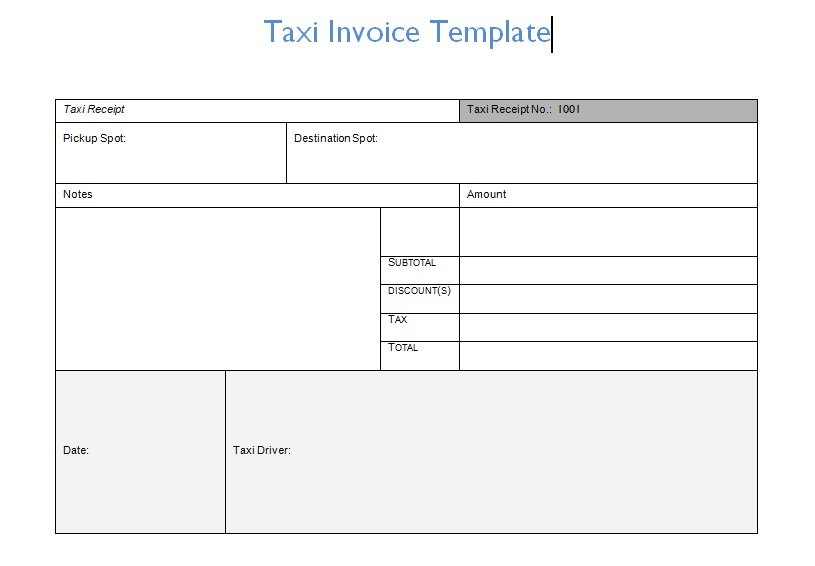
Taxi Invoice Template Word
A full taxi invoice in Word, with driver and company details, trip details, and an itemized fare table. Add your company name and logo, then print it or save it as a PDF for each passenger.
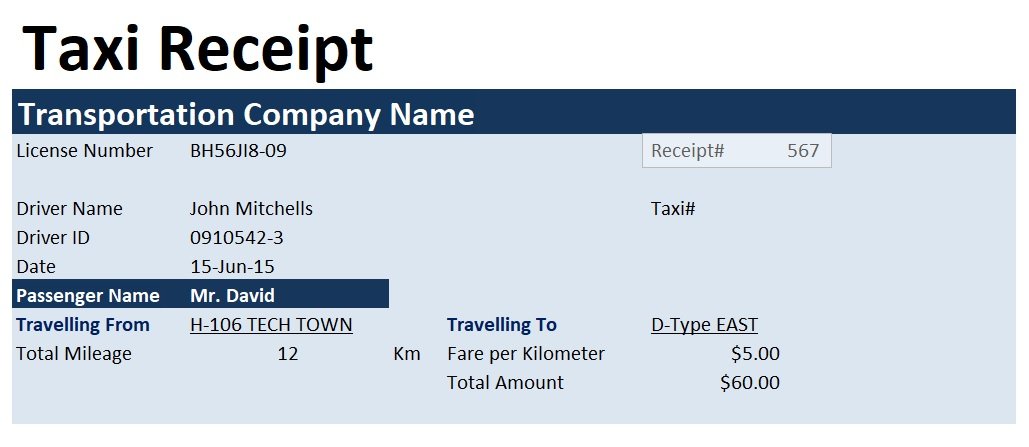
Taxi Invoice Excel Template
A taxi invoice in Excel that calculates the fare for you. Enter the miles, rate, waiting time, and tolls, and the sheet works out the subtotal, tax, and total automatically.
Blank Taxi Receipt Template
A short blank receipt in Word with fields for the date, fare, driver name, and signature. Print a batch and keep them in the cab for any passenger.

Cab Receipt Template
A cab receipt in Word with space for the cab number, company name, and trip details. Made for fleets where several drivers use the same form.

Free Taxi Receipt Template
A free taxi receipt in Word with an itemized fare section and a payment method line. A good everyday choice for independent drivers who want a simple receipt.

Printable Taxi Receipt Template
A printable taxi receipt in Word format, designed to print cleanly on one page. Print several copies at the start of the week and fill them in by hand.

Taxi Fare Receipt Template
A taxi fare receipt in Word that focuses on the fare, with separate lines for the base fare, distance charge, waiting time, and tolls. Best for an expense claim.

Guide:
Good invoicing is a habit, not a chore. The drivers who keep the best records follow the same few rules.
- Invoice every ride, even cash rides: cash fares are the easiest to forget and the hardest to prove later. A one minute invoice keeps your income record complete.
- Number invoices in order: never skip a number or reuse one. A gap in the numbers looks like a missing ride to a tax office.
- Keep copies for at least a year: file a copy of every invoice by date and number, on paper or as a PDF.
- Match the invoice to the meter: before you hand it over, check the total against the meter reading. A mismatch is easy to fix on the spot.
- Offer a digital copy: many passengers lose paper receipts. An emailed PDF costs nothing and makes you the driver they book again.
- Check your local rules: some cities require licensed taxis to issue a receipt when asked, and some require a tax number on the invoice. Add what your city requires to your master template once.
Frequently Asked Questions
What is the purpose of a taxi invoice?
A taxi invoice gives the passenger a written record of the trip and the fare charged. It lists the date, route, distance, fare breakdown, and payment method, so both sides have proof of the transaction. Drivers use it for bookkeeping and tax records, while passengers use it to claim travel expenses or settle a dispute about the fare.
Can I use a taxi invoice for tax deductions?
Yes, if the trip was for business. Keep the invoice with your other travel records and note the business purpose of the trip on it. Self-employed drivers can also use their own invoices to support income and expense records. Check your local tax rules or ask a tax adviser, because deductible expenses and record keeping requirements differ by country.
Is a taxi invoice legally required?
In most places, a taxi invoice is not required for each ride, but many cities require drivers to give a receipt when a passenger asks for one. Business passengers need one for expense claims. Even where it is not required, issuing an invoice protects the driver, because it creates a record of the fare, the route, and the payment received.
Are digital taxi invoices acceptable?
Yes. A digital invoice is acceptable as long as it shows the same details as a paper one: driver or company name, date, route, fare breakdown, total, and payment method. Save a PDF copy and send it to the passenger by email or message after the trip. Many companies and tax offices accept digital copies in place of paper receipts.
