
A payslip template helps businesses prepare a clear record of employee earnings, deductions, and take-home pay. You can use an Excel payslip template for calculations, a Word payslip template for straightforward manual editing, or a PDF payslip template for printing and sharing a consistent document.
The right template should make it easy to identify the employee, understand the pay period, review each earnings and deduction item, and confirm the final amount payable. Before issuing a payslip, customise the template to match your payroll process and the requirements that apply in your country.
Explore the free payslip templates below, compare their file formats, and choose the option that best suits your business.
Create Your Payslip Online
Enter employee and salary details, preview your payslip, and download a professional PDF — all in one place.
What Is a Payslip and Why Does Your Business Need It?
A payslip, also called a pay slip, pay stub, or salary slip, is a document that explains how an employee’s pay has been calculated for a particular pay period. It typically identifies the employer and employee, lists earnings and deductions, and shows the net amount payable.
Depending on the payroll system and local requirements, a payslip may also include hours worked, overtime, pension contributions, tax information, and year-to-date totals.
Why a Payslip Matters
- Pay transparency: Employees can see how their basic salary, overtime, allowances, bonuses, and deductions contribute to their final pay.
- Payroll accuracy: An itemised statement makes it easier to identify missing payments, incorrect deductions, or calculation errors.
- Record keeping: Employees and employers can retain a record of payments for accounting, financial documentation, and resolving payroll queries.
- Administrative efficiency: A consistent template helps payroll staff prepare payslips in a standard format for each pay period.
- Compliance support: A suitable template can help organise required payroll information. However, the template must be adapted to applicable employment and payroll laws.
The legal requirements for issuing payslips differ by country and may depend on the type of employment. Employers should check the rules that apply to their organisation rather than assuming a general-purpose template automatically meets every requirement.
Importance of Payslip Template
A well-organised payslip template gives employees and payroll teams a consistent way to document salary payments.
For employees, it provides a breakdown of the amount earned, the deductions applied, and the final payment received. It can also support an application for a loan, rental agreement, or other financial service when proof of income is requested. The organisation receiving the document may require additional evidence.
For employers, a reusable template reduces the need to recreate the same document for every employee and pay period. It also encourages consistent labelling of earnings, deductions, and payment dates.
A payslip should accurately reflect the underlying payroll records. It is not, by itself, a guarantee that a payment has been made correctly or that an employer has fulfilled every legal obligation.
Payslips may be printed or provided electronically, depending on the employer’s process and applicable requirements. Digital copies should be stored and shared securely because they contain confidential employment and financial information.
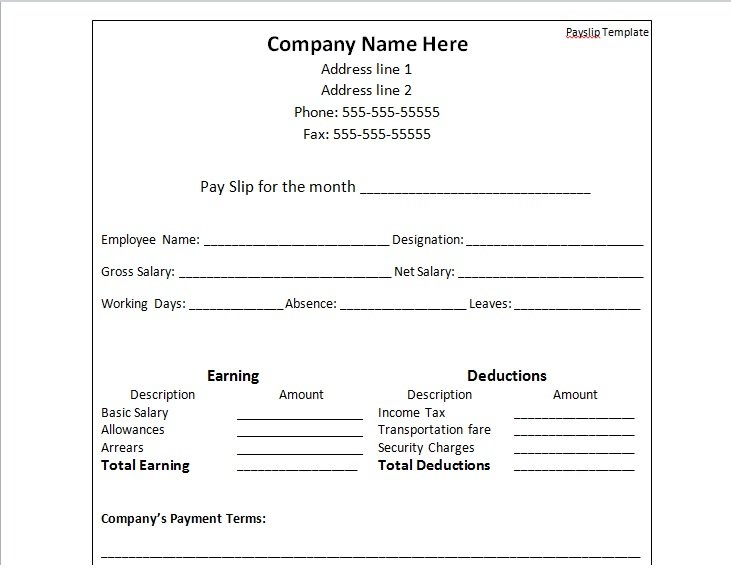
Get Professional Payslip Templates (Excel, Word, PDF)
A professional payslip should be easy to read, simple to update, and suitable for the way your organisation processes payroll.
The templates on this page offer several formats for different needs. Excel is useful when calculations or repeated updates are required, Word is convenient for manual editing, and PDF is suitable for preserving a consistent layout when printing or distributing a completed document.
Before using a downloaded template, check that its fields match your payroll process. A template designed for weekly wages, for example, may need adjustments before it can be used for monthly salaries or employees with variable earnings.
Key Components of a Payslip Template
A useful payslip template separates employee information, earnings, deductions, and the final amount payable. The exact fields depend on local requirements, employment arrangements, and company payroll policies.
Employee and Company Information
The identification section should contain enough information to distinguish the employer, employee, and pay period.
Common fields include:
- Company or employer name and address.
- Employer registration or identification details, where required.
- Employee’s full name and employee number.
- Department, job title, or other internal identifier, if relevant.
- Pay period start date and end date.
- Date of payment.
Check names, identification numbers, and dates carefully before issuing the document. If an employee number is sufficient for internal identification, avoid adding unnecessary personal information.
Earnings Section
The earnings section explains the amounts included in the employee’s pay before employee deductions.
Depending on the employment arrangement, it may include:
- Basic salary or wages: The employee’s regular pay for the relevant period.
- Overtime pay: Additional earnings for eligible overtime hours.
- Allowances: Applicable housing, transport, meal, or other allowances.
- Bonuses and commissions: Additional payments earned during the pay period.
- Shift or other premiums: Additional compensation where applicable.
For hourly employees, include the relevant hours worked and pay rates when required or useful for understanding the calculation.
Itemise different earnings rather than combining unrelated payments into one unexplained figure. This helps employees check whether their pay reflects the hours, rates, and additional payments recorded by the employer.
Deductions Section
The deductions section lists amounts subtracted from the employee’s earnings.
Depending on the jurisdiction and employment arrangement, deductions may include:
- Income tax withheld.
- Employee pension or retirement contributions.
- Employee insurance contributions.
- Other permitted deductions under applicable law and company policy.
Label each deduction clearly and confirm that it is authorised and calculated correctly. Employer-paid contributions should be distinguished from deductions taken from the employee’s pay.
A template should not automatically apply a tax rate or deduction simply because a field is available. Payroll calculations must reflect the employee’s circumstances and the rules that apply to the employer.
Net Pay & Year-to-Date Totals
Net pay is the amount payable to the employee after the relevant deductions have been applied.
A basic calculation is:
Net Pay = Gross Earnings − Employee Deductions
Gross earnings generally include the applicable salary or wages and other earnings for the period. The exact treatment of individual items depends on the payroll rules that apply.
For example, if an employee earns 3,000 in basic salary and 200 in additional earnings, gross earnings are 3,200. If employee deductions total 300, the resulting net pay is 2,900. These figures are illustrative and do not represent a particular country’s tax calculation.
Some payslips also show year-to-date (YTD) totals. These figures accumulate relevant earnings and deductions from the beginning of the applicable reporting year. Include them when they are required or useful for the organisation’s payroll process.
If you use Excel, verify the formulas with sample figures before relying on the template for actual payments.
Additional Fields and Optional Information
Depending on your business and local requirements, you may also need:
- Leave balances, where appropriate.
- Hourly rate and hours worked.
- Relevant tax codes or payroll identifiers.
- Payment method, if useful or required.
- Authorised signatory, where applicable to your process.
Bank account information should not be included unnecessarily. If payment details are needed for internal records, protect them appropriately and avoid exposing full account numbers on documents shared more widely than necessary.
Free Payslip Templates in Excel, Word, and PDF
Choose from the following template options. The file formats and sizes are reproduced from the original listing and should be checked against the current downloadable files before use.
Free Printable Payslip Template
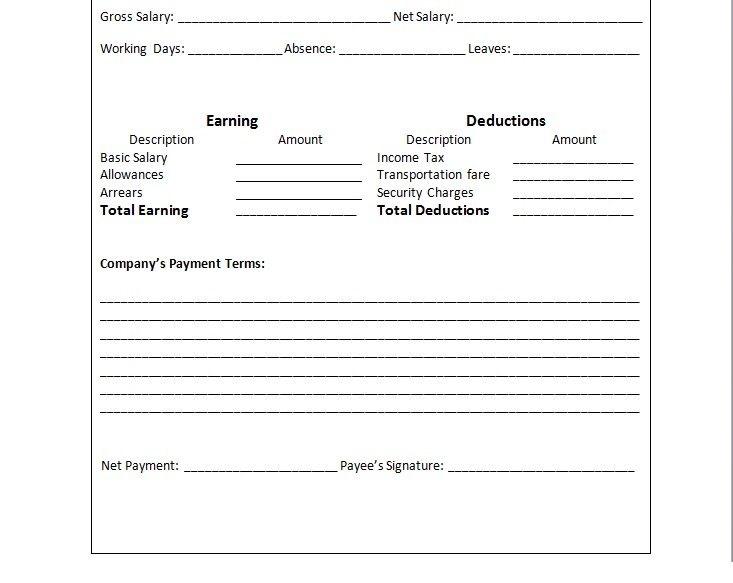
Payslip Format in Excel
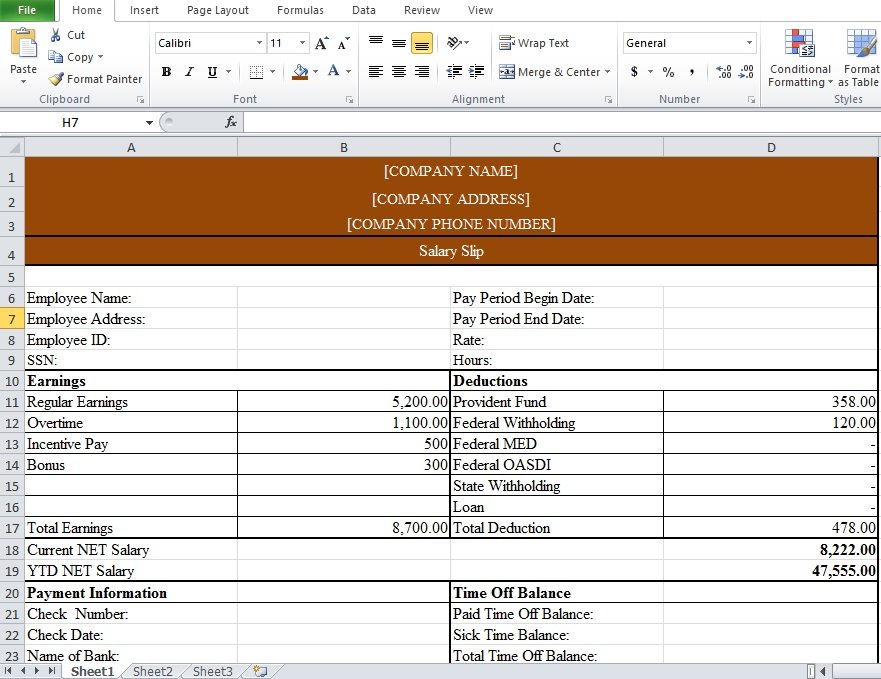
Complete Payslip Template
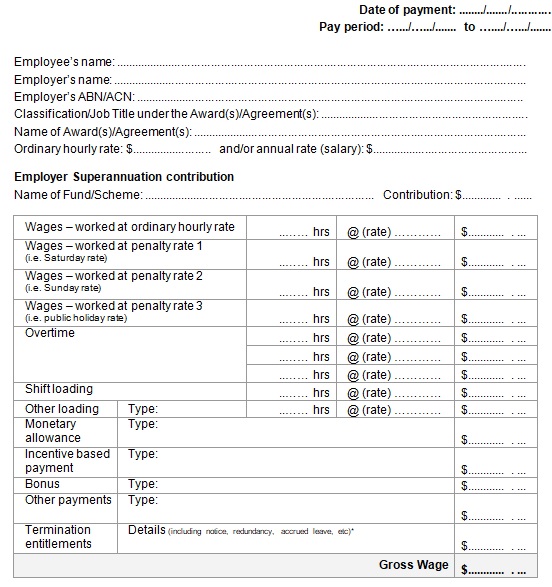
Free Payslip Template Word

Online Payslip Template
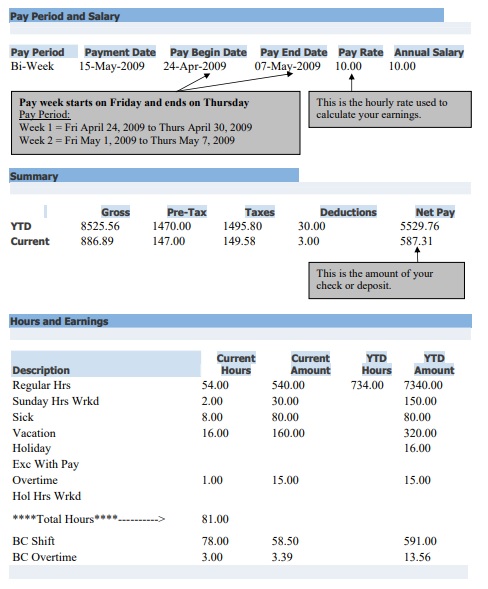
Taxi Workers Payslip Template
How to Choose or Build the Right Payslip Template
Selecting a suitable payslip template starts with understanding how your business pays employees and what information each statement needs to contain.
1. Assess Your Business Needs
Consider the following questions before choosing a template:
- How many employees do you pay each period?
- Do employees receive monthly salaries, weekly wages, or another payment schedule?
- Do you need to calculate overtime, commissions, bonuses, or different pay rates?
- Are deductions or contributions different for different employees?
- What information must appear on payslips under the rules applicable to your business?
- Will payroll staff prepare documents individually or generate them in batches?
A small business with a few salaried employees may need only a simple template. An organisation with hourly staff, multiple allowances, and variable deductions will generally benefit from a more structured format with clearly separated calculations.
2. Decide on the Format: Excel, Word, PDF, or Payroll Software
Each format has different strengths and limitations.
- Excel: Excellent for automation and handling large datasets, especially useful if you have many employees or many pay components.
- Word: Simpler layout, fewer calculations, good for smaller businesses.
- PDF: Ideal for distributing digital payslips that maintain layout across devices.
- Payroll software: Often comes with built-in templates and automatisation, but you must check if you can customise fields.
3. Customise the Template
Before issuing a payslip, adapt the template to your organisation’s requirements.
- Add company details. Enter the correct business name and any required employer identifiers. Add a logo if it improves identification without crowding the page.
- Set up employee fields. Include the employee’s name, internal ID, and other necessary information.
- Define the pay period. Make the start date, end date, and payment date clear. Ensure that dates update correctly for every pay cycle.
- List earnings and deductions separately. Use consistent labels for basic pay, overtime, allowances, taxes, and other applicable items.
- Configure calculations. In Excel, check the gross earnings, deduction totals, and net pay formulas. Confirm that blank fields, additional earnings, and changed deduction amounts are handled correctly.
- Apply a clear visual layout. Use readable fonts, restrained brand colours, consistent spacing, and aligned amounts. Make net pay easy to locate without making the rest of the statement difficult to read.
- Review the completed document. Compare the payslip with the payroll records, confirm the arithmetic, and check that the correct employee and pay period appear.
- Save and distribute securely. Keep the completed document in an appropriately restricted location and share it only through an approved channel.
A practical approach is to test the template using sample figures before entering real employee data. Include a case with overtime or a bonus, a case with deductions, and a case with no optional earnings. This can reveal missing formulas and layout problems before the template is used for payroll.
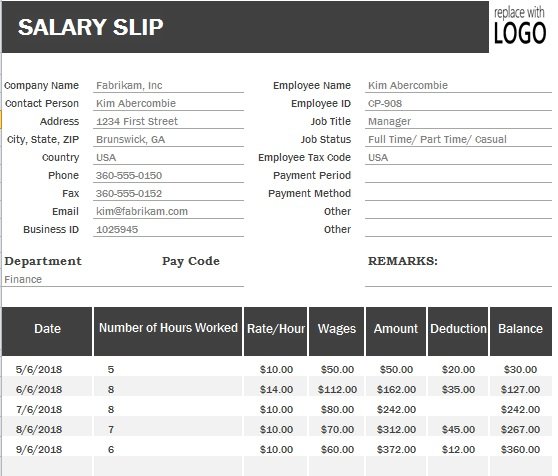
Editable Payslip Template For Employees
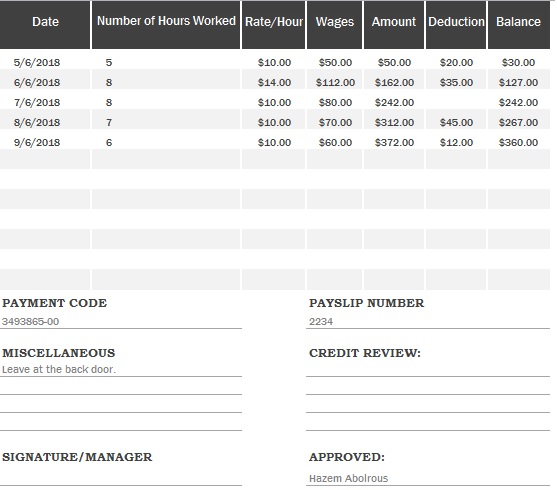
Underneath you see the appealing sneak peek of our composed payslip layout. We have outlined this layout in MS Word so you effectively alter this format while utilizing include/erase alternatives. On the off chance that you need to download this format for your claim utilize so you only a single tick on this catch and download layout for your own particular use. You cannot pay any expense of charges for downloading this layout since this format is thoroughly free from any expense of installment. You may also check the salary breakdown excel template.
Basic Payslip Template Free Download
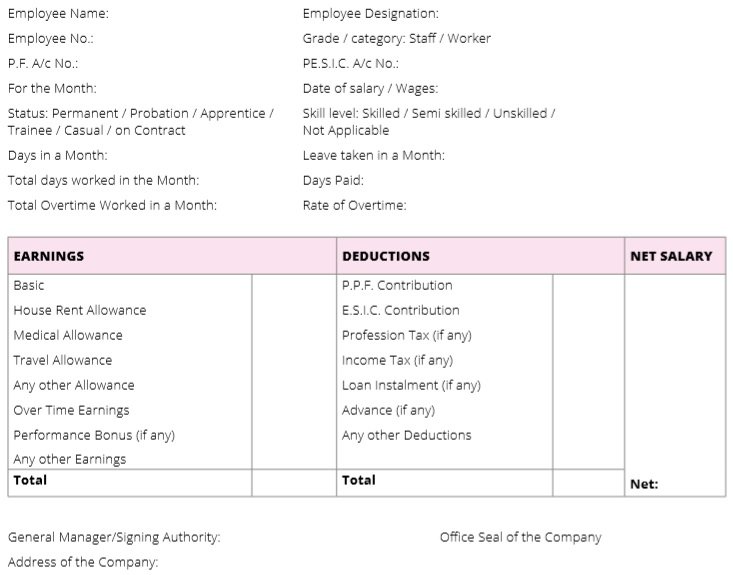
Payslip with Additional Notes Template
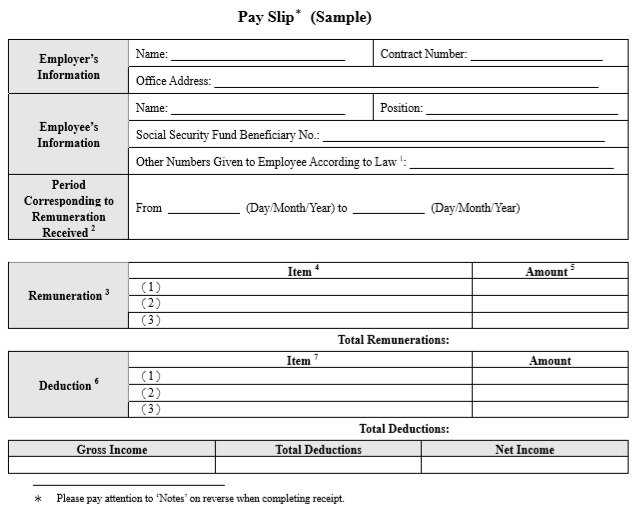
Example of Payslip Template
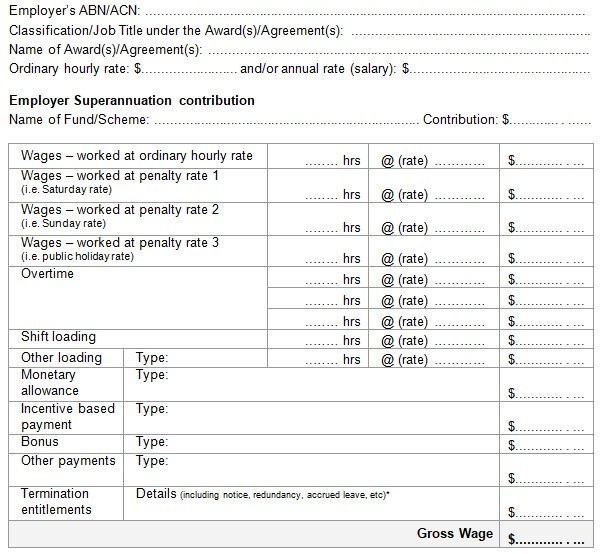
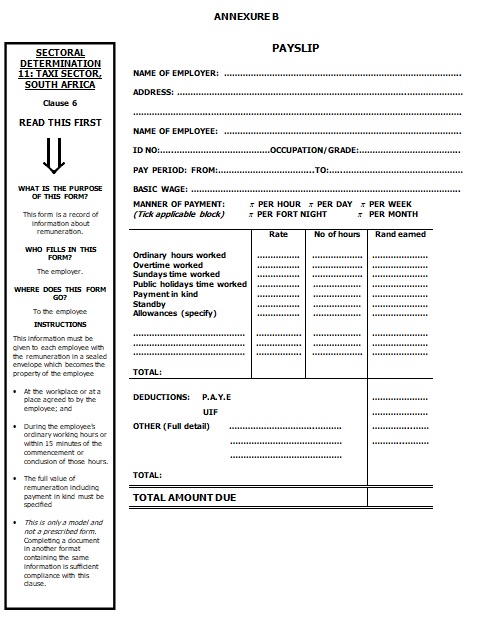
Payslip Template for Taxi Workers
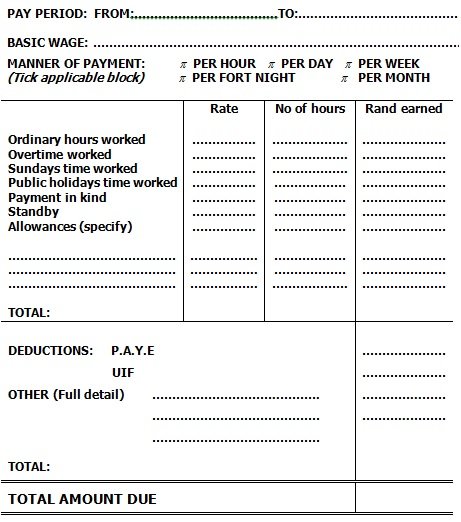
Editable Payslip Template Excel
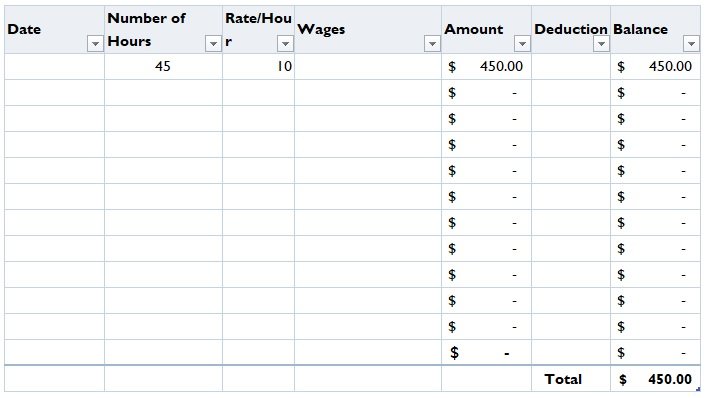
Simple Weekly Payslip Template
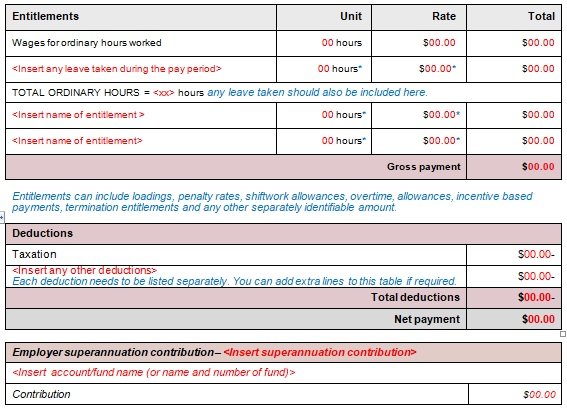
Frequently Asked Questions (FAQs):
What information must a payslip include?
A payslip commonly identifies the employer and employee, states the pay period and payment date, and itemises earnings, deductions, and net pay. Additional information, such as hours worked, tax details, contributions, or year-to-date totals, may be required depending on the jurisdiction and employment arrangement.
Which payslip format should I choose: Excel, Word, or PDF?
Excel is useful for repeated calculations when its formulas are configured and checked. Word is convenient for manual editing, while PDF is suitable for sharing or printing a consistent final document. Choose the format that fits your payroll process and the level of editing required.
Does an Excel payslip template calculate salary automatically?
Only if the workbook contains correctly configured formulas. Some Excel templates are primarily designed for manual entry. Before using a workbook for actual payroll, test how it calculates gross earnings, deductions, and net pay, including overtime and other variable items where applicable.
Can I send payslips electronically by email or PDF?
Electronic payslips may be acceptable in many jurisdictions, but the applicable rules should be checked before choosing a distribution method. The document should remain readable and accessible to the employee, and the employer should use appropriate safeguards to protect confidential information.
What is the difference between a payslip and a salary certificate?
A payslip provides a breakdown of earnings and deductions for a particular pay period. A salary certificate is a separate document that confirms employment or salary information, often for a specific administrative or financial purpose. The exact contents and acceptance requirements of a salary certificate depend on the organisation requesting it.
What should I do if a payslip contains an error?
Check the original payroll records to identify the cause, correct the underlying calculation or data, and update the relevant payroll records. If a revised payslip is needed, issue a corrected statement through the appropriate process and explain the correction to the employee. Any necessary payment adjustment should also be handled according to applicable payroll rules.
