
A school fee receipt template is a ready-made receipt that a school gives to parents or guardians as proof that a fee has been paid. It records who paid, for which student, how much, and for what: tuition, transport, lab fees, admission, or a donation. Schools use receipts to keep clean fee records, and parents keep them as proof of payment for their own files, for employer reimbursement, or for tax records where fees are deductible.
Below you will find a sample receipt layout showing every field a good receipt needs, followed by 11 free templates in Word, PDF, and Excel. Each one is editable: change the school name, student details, and amounts, then print it in duplicate so the office and the parent each keep a copy.
Sample School Fee Receipt Layout
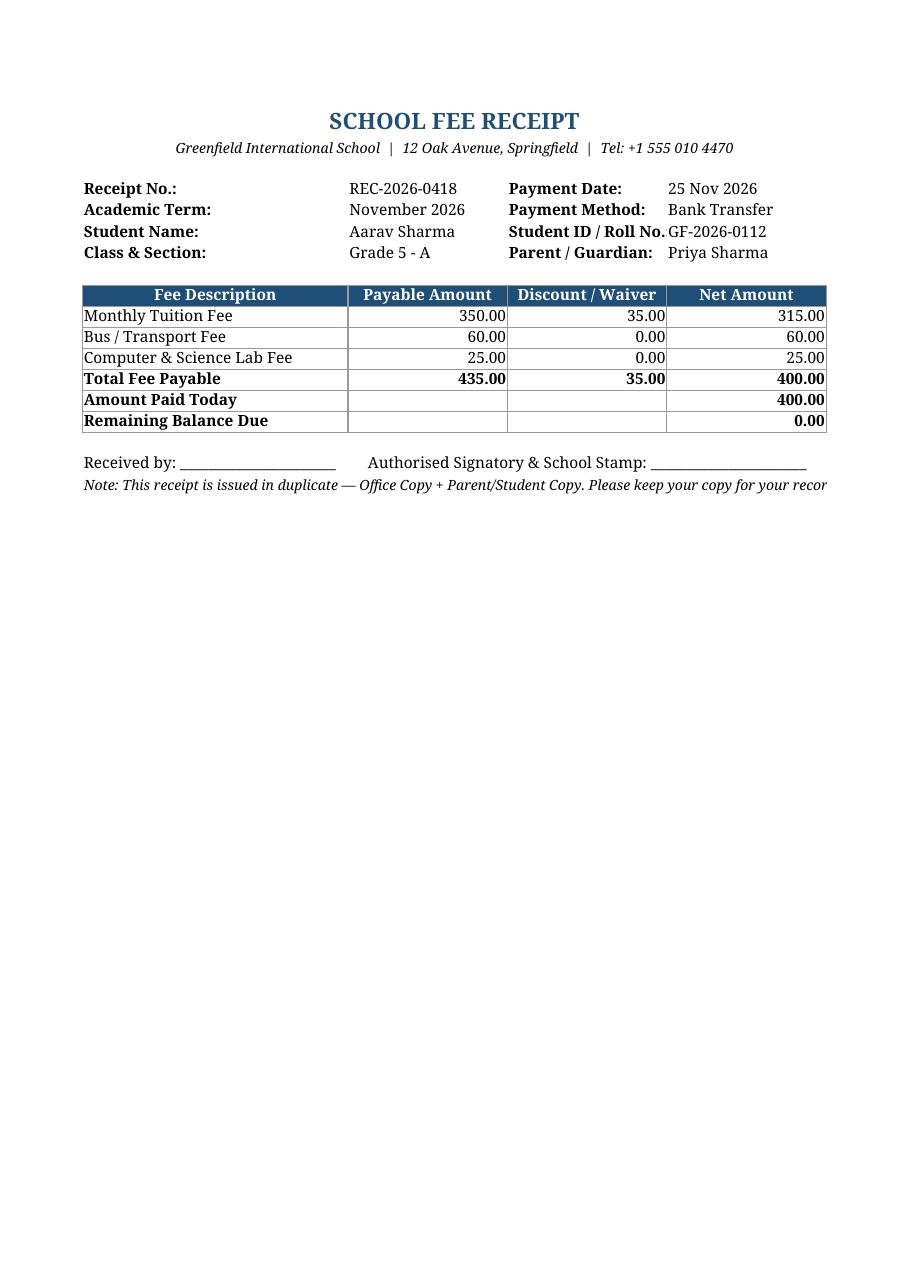
A complete school fee receipt has two parts: a header with the receipt and student details, and an itemised breakdown of the fees. Here is how a filled-in receipt looks.
| Receipt No. | REC-2026-0418 | Payment Date | 25 Nov 2026 |
| Academic Term / Month | November 2026 | Payment Method | Bank Transfer |
| Student Full Name | Aarav Sharma | Student ID / Roll No. | GF-2026-0112 |
| Class & Section | Grade 5 – A | Parent / Guardian Name | Priya Sharma |
| Fee Description | Payable Amount | Discount / Waiver | Net Amount |
| Monthly Tuition Fee | $350.00 | -$35.00 (Sibling 10%) | $315.00 |
| Bus / Transport Fee | $60.00 | $0.00 | $60.00 |
| Computer & Science Lab Fee | $25.00 | $0.00 | $25.00 |
| Total Fee Payable | $435.00 | -$35.00 | $400.00 |
| Amount Paid Today | – | – | $400.00 |
| Remaining Balance Due | – | – | $0.00 |
The discount column matters: many schools offer sibling discounts, staff discounts, or scholarships, and the receipt should show the discount as its own line so the parent can see exactly what was waived. If only part of the fee is paid, the balance due line shows what is still outstanding, and the next receipt picks it up.
Different types of school fee receipts:
Schools issue different receipts for different payments. A tuition fee receipt covers monthly or termly tuition; an admission fee receipt covers the one-off admission or enrolment charge; a transport fee receipt covers bus or van charges; an activity fee receipt covers sports, clubs, and field trips; and a donation or fundraiser receipt records gifts to the school rather than fees owed. Driving schools use their own receipt for lesson packages and test fees. Pick the template that matches the payment, so the receipt shows the right fee lines.
What to include in a school fee receipt?
Every school fee receipt should include the school’s name and address, a unique receipt number, and the payment date. It must show the student’s full name, student ID or roll number, and class, plus the parent or guardian’s name. The fee section lists each charge separately with its amount, any discount or waiver, the total payable, the amount paid, and the balance due. Finally, it should show the payment method (cash, bank transfer, or check) and carry the signature of the person who received the payment, plus the school stamp where one is used.
Benefits of using a school fee receipt:
A standard receipt template keeps every fee record in the same format, which makes the school office faster and the accounts easier to audit. Parents get clear proof of payment they can file or show to an employer, and disputes about what was paid are easy to settle when both sides hold a matching copy. Itemised receipts also help the school track fee income by type, so tuition, transport, and donations are not mixed together in one figure, and the totals feed straight into the school’s school budget template at the end of each term.
Download any of the free templates below. The Word files are editable, the PDF files are print-ready, and the Excel template calculates its own totals.
School Tuition Fee Receipt Template
A full tuition fee receipt with space for the student’s name and class, the term, and an itemised list of charges. Print it on school letterhead and stamp it for an official record.

School Fundraiser Receipt Template
For school fundraisers, charity drives, and sponsored events. It records the donor’s name, the event, and the amount given, so the school can thank donors and track totals.

School Fee Receipt Template Word
A simple, editable Word receipt for everyday fee payments. Change the school name, student details, and amounts, then print two copies: one for the office and one for the parent.

School Fee Payment Receipt Template
For monthly or termly fee payments, with fields for the payment date, the amount paid, the payment method, and any balance still due.

School Donation Receipt Template
A donation receipt for gifts to the school, with donor details, the donation amount, and the date. Donors can keep it with their records for tax purposes where donations are deductible.

Receipt for School Tuition
A one-page tuition receipt in PDF, ready to print and fill in by hand. It covers the student, the term, the tuition amount, and the amount received.

Receipt for School Payment
A general school payment receipt for tuition, activity fees, and other charges. It shows what was paid, how it was paid, and what remains outstanding.

Receipt for Driving School
For driving schools and driving instructors. It records the learner’s name, the lesson package or test fee, the amount paid, and the balance for remaining lessons.

Printable School Fee Receipt Template
A clean printable receipt in Word that works for any fee type. Edit the fee lines to match your school’s charges, then print it as a duplicate receipt book page.

Free School Payment Receipt Template
A free one-page payment receipt in PDF for quick use at the school office. Fill in the student, the fee, and the amount paid, then sign and stamp it.

School Fee Receipt Template Excel
An Excel receipt with working formulas: enter the fee amounts and discounts, and the totals, amount paid, and balance due calculate themselves. The sample receipt in the file matches the layout shown above.
How to make a school receipt?
Start with the template that matches the payment, then fill in the header: school name, receipt number, date, and term. Add the student’s details and the parent’s name, then list each fee on its own line with the amount due and any discount. Total the fees, enter the amount paid, and let the balance due show what is left. Match the term dates on the receipt to the school schedule template so the receipt, the timetable, and the accounts all use the same term. Print two copies, sign both, stamp them if your school uses a stamp, and file the office copy by receipt number so any receipt can be found again in seconds.
Frequently Asked Questions
What details must be included on a school fee receipt?
A school fee receipt must show the school’s name, a unique receipt number, the payment date, the student’s full name, ID, and class, and the parent or guardian’s name. It must itemise each fee with its amount, show any discount, the total payable, the amount paid, the balance due, and the payment method, and carry the receiver’s signature.
How do I record partial fee payments or remaining balances on a receipt?
Show the full fee payable, then the amount paid today, and carry the difference forward as the balance due. The next receipt for that student should show the outstanding balance as its own line, so the parent can see the running total. The Excel template on this page calculates the balance due automatically.
Can parents use a school tuition receipt for tax deductions or employer reimbursement?
It depends on the country and the employer’s policy. In the United States, K-12 tuition is generally not deductible on federal taxes, with narrow exceptions such as special-needs schooling claimed as a medical expense and 529 plan withdrawals of up to $10,000 a year for K-12 tuition. For any claim or employer reimbursement, keep the receipt with the school’s tax ID or EIN, the school stamp, and proof of payment.
Should a school issue duplicate copies of a fee receipt?
Yes. Every fee receipt should be issued in duplicate: an Office Copy that the school files by receipt number, and a Parent/Student Copy that goes home. Matching copies protect both sides if a payment is ever questioned, and they make audits far simpler.
Can I customize these school fee receipt templates in Word, Excel, or Google Docs?
Yes. The Word templates open in Microsoft Word or Google Docs, the Excel template opens in Excel or Google Sheets with its formulas working, and the PDF templates are print-ready. Change the school name, student details, fee lines, and currency to match your school before printing.
